Alert Management
OpsRamp’s Alert Management system provides comprehensive tools for monitoring, analyzing, and responding to alerts across your IT infrastructure. This section covers the complete alert management workflow, from viewing and analyzing alerts to configuring sophisticated alert policies.
Overview
Alert Management in OpsRamp consists of two main components:
Alert Browser
The Alert Browser is your central hub for viewing, searching, and managing alerts. It provides:
- Real-time alert visualization
- Advanced search capabilities using OPSQL and filters
- Customizable alert views and column settings
- Comprehensive alert side panel with actions and details
- Alert export functionality
Alert Policies
Alert Policies enable intelligent alert processing through various automated workflows:
- Alert Problem Area: Group related alerts to reduce noise
- Alert Correlation: Identify relationships between alerts
- Alert First Response: Automate initial response actions
- Alert Escalation: Define escalation paths for unresolved alerts
- Alert Prediction: Predict potential issues before they occur
Getting Started
To begin with alert management:
- View Alerts: Start with the Alert Browser to see current alerts
- Configure Policies: Set up Alert Policies for automated processing
- Customize Views: Configure alert views and filters for your workflow
Management Workflow
The typical alert management workflow includes:
- Alert Generation: Alerts are generated from monitoring systems
- Alert Processing: Policies automatically process incoming alerts
- Alert Analysis: Teams review and analyze alerts in the browser
- Response Actions: Teams take appropriate actions based on alert severity
- Resolution: Alerts are resolved and lessons learned are captured
Alert Policies Evaluation
OpsRamp processes alerts through a defined policy evaluation pipeline to determine how alerts are correlated, suppressed, and escalated. Understanding this flow helps set correct expectations about when alerts appear in the Alerts page and how suppression is applied.
Current Alert Policy Process Flow (Default)
By default, OpsRamp evaluates alert policies in the following order: Alert Correlation (ACP) → Alert First Response (FRP) → Alert Escalation (AEP)
In this flow:
- An alert is generated by a monitoring source.
- The alert is first evaluated by Alert Correlation policies.
- The alert is then evaluated by First Response policies for actions such as suppression.
- If applicable, the alert proceeds to Escalation policies for further notifications or ticketing.
Why alerts may briefly appear
- Because correlation is evaluated before first response, alerts can briefly appear on the Alerts page before suppression is applied.
- This delay is typically 1–5 seconds and is expected behavior based on the internal alert processing sequence.
Updated Alert Process Flow (First Response Before Correlation)
OpsRamp provides an option to prioritize First Response processing for environments that require immediate suppression. When the “Apply First Response Before Correlation” setting is enabled, the alert flow changes to: Alert First Response (FRP) → Alert Correlation (ACP) → Alert Escalation (AEP)
How this works:
When this option is selected:
- Alerts are evaluated by First Response policies first.
- If an alert is suppressed or snoozed by FRP, it becomes a terminal decision.
- Suppressed alerts do not continue to correlation or escalation processing.
- The alert does not interact with other downstream policy frameworks.
- This ensures that alerts intended to be suppressed do not appear in the Alerts page or further evaluated by other policies.
Benefits of Applying First Response First
Enabling this option:
- Prevents suppressed alerts from being briefly visible in the Alerts page
- Reduces noise in 24×7 operational monitoring environments
- Avoids unnecessary correlation, escalation, and notification processing
Enabling First Response Before Correlation
To enable this behavior:
- Navigate to Setup > Account.
- On the Account Details screen, select SETTINGS.
- On the Account Settings page, select Advanced Settings.
- Under Event Management, enable the checkbox: Apply First Response Before Correlation
- Save the changes.
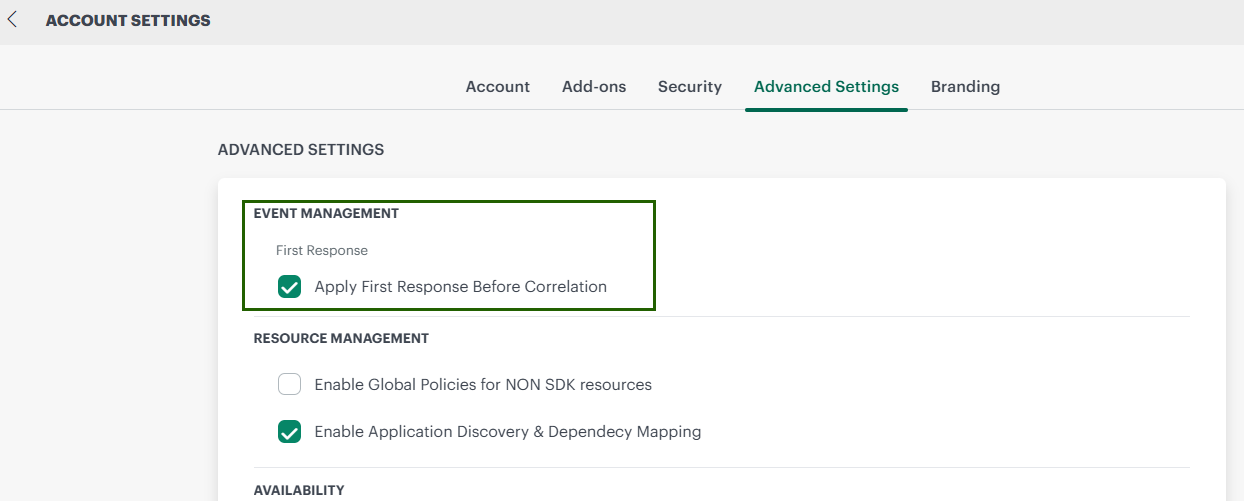
Once enabled, the updated evaluation flow takes effect for newly generated alerts.
Important Notes
- This setting applies only to new alerts generated after it is enabled.
- The updated flow does not change how existing alerts are processed.
- First Response evaluation is enforced first and those alerts bypasses all downstream policies if applicable per policy filters.
Continue to the specific sections to learn more about each component of the alert management system.